Manage Attributes
/api/external/attribute
This API requires authentication with an API key from your organization. See our API Authentication article for more details.
The attributes API allows for fetching, creating, and updating your organization's attributes.
Getting all attributes
GET https://your-organization.revision.app/api/external/attribute
This returns a JSON response with an array of all of your attributes, following this example structure:
[
  {
    "id": "5cW9LmzRZcu",
    "name": "Demo",
    "desc": "This is a documentation demo attribute.",
    "type": "LIST",
    "list": ["First", "Second", "Third"],

    "required": false
  },
  {
    "id": "NvYE1OdMJGw3",
    "name": "Other Demo Attribute",
    "desc": null,
    "type": "LINK",

    "required": true,
    "apiContext": "2026-01-01 01:01:01"
  }
]
Creating attributes
Create new attributes using the POST endpoint without providing an id field.
POST https://your-organization.revision.app/api/external/attribute
Example of creating a new attribute:
[
  {
    "name": "Demo",
    "desc": "This is a documentation demo attribute.",
    "type": "LINK",
    "required": true
  }
]
Example of creating multiple attributes:
[
  {
    "name": "Environment",
    "type": "LIST",
    "list": ["Production", "Staging", "Development"],
    "required": true
  },
  {
    "name": "Owner",
    "type": "STRING",
    "required": false
  }
]
Updating attributes
Update existing attributes using the POST endpoint with the attribute's id field.
Learn about Create vs Update to understand how to identify resources for create and update operations.
POST https://your-organization.revision.app/api/external/attribute
Example of updating an existing attribute:
[
  {
    "id": "5cW9LmzRZcu",
    "name": "Updated Demo",
    "desc": "This is an updated documentation demo attribute.",
    "type": "LIST",
    "list": ["First", "Second", "Third"],
    "required": false
  }
]
Learn about Create vs Update to understand partial updates and field modification.
Assigning attributes to components and setting values is done through the Components API. See the Attributes core concept for detailed information about attribute types and usage.
Data Types
| Value | Description |
|---|---|
name: string | The attribute's name. |
id?: string | An internal ID set by Revision. Reuse this to update attributes. |
type: enum | The attribute's type: STRING | NUMBER | BOOLEAN | LINK | USERLIST | LIST. |
desc?: string | Optional field, the attribute's description. |
| required?: boolean | Optional field, whether or not this attribute is required. Defaults to false. |
| apiContext?: string | Optional field, used to keep track of a payload. Defaults to a date if not provided, in the format of 2026-01-01 01:01:01. |
| list?: string[] | An array required and only permitted when the attribute's type is LIST. Contains strings of possible list options. |
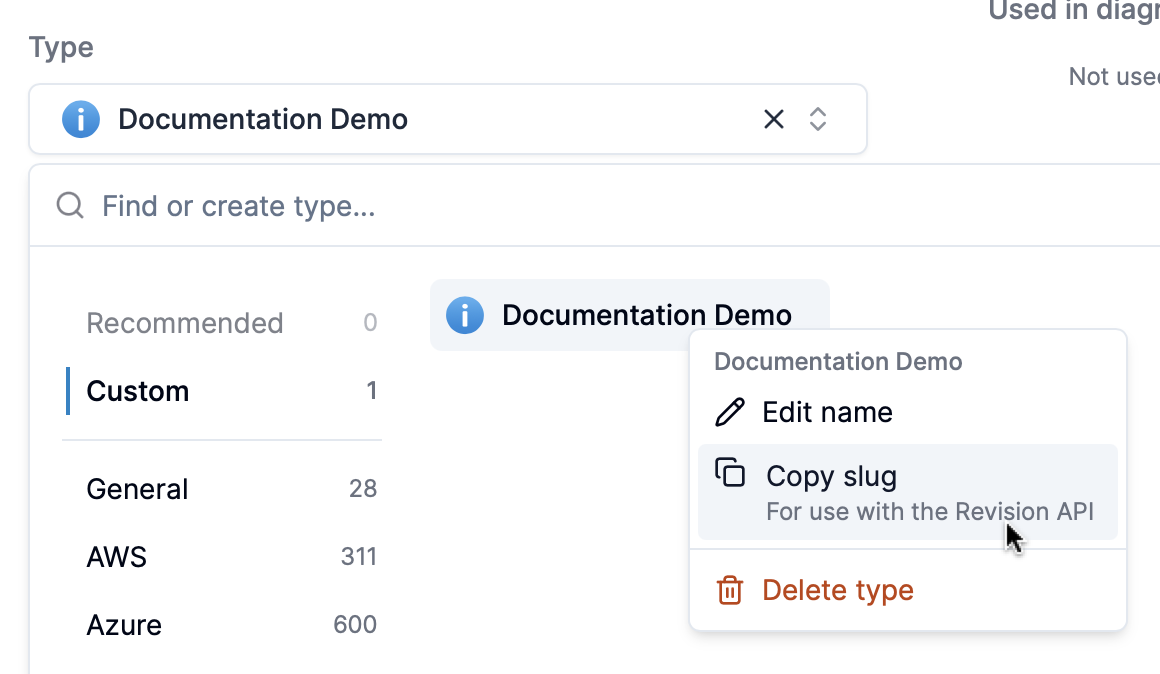
You can find type IDs by right-clicking types in the type selector.
Examples
Creating a new attribute
curl -X POST https://your-organization.revision.app/api/external/attribute \
  -H "Content-Type: application/json" \
  -H "Authorization: Bearer a0e08cad-184b-48a4-miku-14776a549b79" \
  -d '[
    {
      "name": "Environment",
      "desc": "Deployment environment for the component",
      "type": "LIST",
      "list": ["Development", "Staging", "Production"],
      "required": true
    }
  ]'
Updating an existing attribute
curl -X POST https://your-organization.revision.app/api/external/attribute \
  -H "Content-Type: application/json" \
  -H "Authorization: Bearer a0e08cad-184b-48a4-miku-14776a549b79" \
  -d '[
    {
      "id": "5cW9LmzRZcu",
      "name": "Updated Environment",
      "desc": "Enhanced environment attribute with more options",
      "type": "LIST",
      "list": ["Dev", "Test", "Staging", "Prod", "DR"],
      "required": false
    }
  ]'