Microsoft BizTalk Server Integration
The BizTalk integration allows you to import integration components from your BizTalk Server applications into Revision, providing visibility into your enterprise integration architecture.
Configuration
A BizTalk integration requires uploading a "binding file." The BizTalk binding file can be exported at both the application and server levels; that is up to you.
Exporting Binding Files
Application-Level Export
- Open BizTalk Server Administration Console
- Expand BizTalk Server Administration > BizTalk Group > Applications
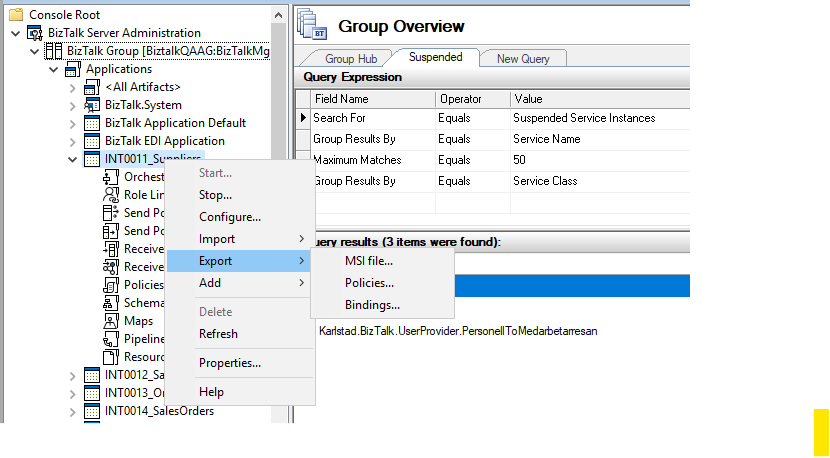
- Right-click your application and select Export > Bindings
- Choose a location and filename for the binding file
- Select the appropriate export options for your needs
Server-Level Export
- Open BizTalk Server Administration Console
- Right-click BizTalk Group and select Export Bindings
- Choose to export all applications or select specific ones
- Save the binding file to a accessible location
Uploading to Revision
- Navigate to the integrations section in your Revision organization settings
- Select BizTalk Server as the integration type
- Upload your exported binding file
- Review the discovered resources
- Select which components to import into Revision
Supported Resources
Revision will currently import the following types from BizTalk:
- Receive Port - Inbound message reception points
- Send Port - Outbound message transmission points
The amount of listed resources may as such not be the same as the total resource count in your binding file, as Revision focuses on the core integration components.
Automatic Data Enrichment
All imported BizTalk components will have generated attributes containing system-specific information that provides detailed context about each component:
Receive Ports:
- Adapter type (File, HTTP, SQL, etc.)
- Transformations applied
- Receive location address/URI
Send Ports:
- Adapter type (File, HTTP, SQL, etc.)
- Transformations applied
- Send port address/URI
- Complete send port filter configuration
These attributes are automatically maintained and updated during synchronization, ensuring you always have current access to detailed BizTalk configuration information directly from your architecture diagrams.